Lucky Wave Casino
CasinoBonusesAppRegister PlayGet bonus
Lucky Wave mobile · UK guide

Lucky Wave Mobile App Guide

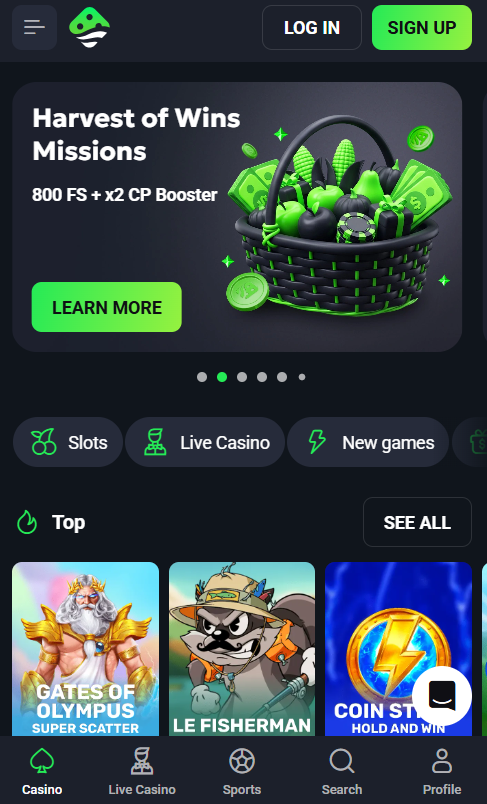
Lucky Wave Casino does not publish a native app on the Apple App Store or Google Play. The full casino platform is delivered through a mobile-optimised website and installs as a Progressive Web App directly from the browser. Once added to the home screen, the PWA behaves like a downloaded app — full-screen mode, dedicated icon, remembered login sessions — while giving mobile players access to the complete library of 4,000+ slots, live dealer tables and payment methods. This page walks UK players through installation on iPhone and Android, feature parity notes and troubleshooting steps.
Lucky Wave Mobile App Guide
★ EDITOR'S CHOICE
C
Casinacho
Our preferred alternative for players who want a bigger catalogue, crypto and lighter bonus requirements.
up to £500 + 150 spins
WELCOME PACKAGE*
CATALOGUE6,000+ games
LIVEEvolution tables
CASHIERcards, e-wallets, crypto
Visit Casinacho →Good to know: Casinacho operates under a foreign (non-UKGC) licence — check you can play from your area and always read the bonus terms. Promotional link · 18+.

Is There a Native Lucky Wave App?

Anyone searching the Apple App Store or Google Play for a Lucky Wave Casino download will come up empty. The operator does not distribute a native application through either official app marketplace, and no verified APK file is available directly from the Lucky Wave brand. This is not unusual for online casinos operating outside the UK Gambling Commission licensing framework — Apple and Google both restrict casino apps in the UK App Store and Play Store to UKGC-licensed operators, and Lucky Wave holds a Costa Rica registration rather than a UKGC licence.

Third-party sites offering downloadable Lucky Wave APK files should be treated with caution — these are not authorised by the operator and can carry security risks including credential theft and mobile malware.
Lucky Wave Casino mobile

How to Install on iPhone and iPad

The Lucky Wave PWA installs on any iPhone or iPad running iOS 15 or later. Installation must be initiated from Safari — Chrome and Firefox for iOS share the same WebKit engine but lack the Add to Home Screen shortcut that PWAs require. Members using an alternative browser on iPhone should switch to Safari before starting.

  1. Open Safari and navigate to the Lucky Wave home page
  2. Tap the Share icon at the bottom of the Safari toolbar (a square with an upward arrow)
  3. Scroll through the share menu to find Add to Home Screen in the second row of options
  4. Confirm or shorten the shortcut name (Lucky Wave by default)
  5. Tap Add in the top-right corner to place the icon on the home screen

Once installed, tapping the Lucky Wave icon launches the platform in full-screen mode without any Safari browser chrome, closest to a native app experience. Session cookies persist between launches on the same device unless browser data is cleared manually.
Lucky Wave Casino mobile

How to Install on Android Devices

⇄ DIRECT COMPARISON
C
Lucky Wave vs Casinacho
Where the balance tips, point by point, by our criteria.
CRITERIONLUCKY WAVECASINACHO ★
Game catalogue4,000+ slots6,000+ titles
Live casinoPragmatic/LuckyStreak/BetGames400+ Evolution tables
Bonus wagering40x, £5 max betLighter requirements
Crypto payouts~1 hourFast BTC/ETH/USDT
Welcome packageup to £15,000 + 350 FSup to £500 + 150 spins
LicenceCosta RicaCuraçao
Try Casinacho →Good to know: Casinacho operates under a foreign (non-UKGC) licence — check you can play from your area and always read the bonus terms. Promotional link · 18+.

Android installation supports Chrome, Firefox and Samsung Internet on any device running Android 8 or later. Chrome handles the PWA installation flow most smoothly and triggers an install prompt automatically after a few seconds on the Lucky Wave home page. Firefox and Samsung Internet require using the browser menu manually.

  1. Open Chrome (or Firefox / Samsung Internet) and go to the Lucky Wave home page
  2. Wait 3–5 seconds for the Install app prompt to appear at the bottom of the screen
  3. Tap Install — or if the prompt does not appear, tap the ⋮ menu top-right and select Install app or Add to Home screen
  4. Confirm Install in the dialog that follows
  5. Find the Lucky Wave icon in the app drawer and on the home screen

On some manufacturers — notably Xiaomi and Huawei with heavy Android skins — the automatic install prompt can be suppressed by aggressive battery-saving policies. In those cases, the manual route through the browser menu works reliably. Lucky Wave does not distribute an APK file, so any third-party download claiming to be an APK should be avoided.

PWA vs Native App — What Works and What Does Not

A Progressive Web App gives most of what a native casino app provides, but not everything. Members should know where the two experiences differ before installing so expectations match reality on day one.

FeatureLucky Wave PWATypical Native Casino App
Full-screen modeYesYes
Complete game library accessYes (4,000+ titles)Yes
Deposits and withdrawalsYesYes
Biometric login (Face ID, fingerprint)NoYes
Push notificationsLimited (web push only)Yes
Offline mode or cached gamesNoPartial
App Store or Google Play listingNoYes

The biggest practical difference for daily use is biometric login. PWAs cannot access Face ID or fingerprint APIs on iOS or Android, so members re-enter email and password on every fresh session or rely on browser autofill and a password manager to speed sign-in. Push notifications also work only through the more limited web push standard rather than native OS notification channels.
Lucky Wave Casino mobile

Mobile Performance and Data Usage

The Lucky Wave PWA is built on standard HTML5 and JavaScript with lazy-loaded slot assets, so data consumption depends heavily on session type. A 10-minute slot session typically uses 15 to 25 MB of data. A 10-minute live dealer session at HD quality uses 80 to 120 MB because of the continuous video feed. Battery drain runs at approximately 8 to 12 percent per 30 minutes of slot play on a modern smartphone such as an iPhone 13 or Google Pixel 6 equivalent, with live dealer streams roughly doubling that figure.

Once the PWA is installed, new members can complete registration and identity verification through the sign-up page, and existing members should review the current welcome package and reload codes on the bonus page before their next deposit.

★ RECOMMENDED MOBILE ALTERNATIVE
C
Casinacho on mobile
Responsive site that runs in the browser with no install — a huge catalogue at your thumb.
6,000+
MOBILE GAMES
ACCESSBrowser, no download
COMPATIBILITYiOS & Android
CASHIERcrypto too
Open Casinacho on mobile →Good to know: Casinacho operates under a foreign (non-UKGC) licence — check you can play from your area and always read the bonus terms. Promotional link · 18+.

Frequently asked questions

Can players download a Lucky Wave APK for Android?
No. Lucky Wave does not distribute an APK file and no official Android package is available for download from the operator. The mobile casino runs entirely through the browser and installs as a Progressive Web App via Chrome, Firefox or Samsung Internet. Third-party sites offering Lucky Wave APK downloads are not authorised and pose security risks including credential theft and mobile malware.
Which iPhone models support the Lucky Wave PWA?
The Lucky Wave PWA installs on any iPhone or iPad running iOS 15 or later — this covers iPhone 6S and every model released since. The installation must be started from Safari because Chrome and Firefox for iOS lack the Add to Home Screen shortcut needed to place a PWA icon on the home screen.
Do all Lucky Wave games work on the mobile version?
Yes. The full Lucky Wave catalogue of 4,000+ titles is available on mobile browsers and through the PWA, including slots from every provider, live dealer tables from Pragmatic Play Live, LuckyStreak and BetGames, and crash titles such as Aviator and Spaceman. Live dealer tables render in both landscape and portrait orientations, with landscape offering the fuller studio view.
Does the Lucky Wave mobile app support biometric login?
No. Because Lucky Wave delivers its mobile casino through a Progressive Web App rather than a native application, the platform cannot access iOS Face ID or Android fingerprint APIs. Members re-enter email and password on each fresh session, or use browser autofill and a password manager to speed sign-in. Two-factor authentication codes work normally through any authenticator app.
How much mobile data does a Lucky Wave session use?
Slot play uses roughly 15 to 25 MB per 10 minutes of session time on the Lucky Wave PWA. Live dealer streams at HD quality use 80 to 120 MB per 10 minutes because of the continuous video feed. Members on capped data plans should switch to Wi-Fi for extended live dealer sessions and rely on 4G or 5G comfortably for slot play.
Can members deposit and withdraw from the Lucky Wave mobile app?
Yes. Every payment function available on desktop works identically through the mobile PWA — deposits by Visa, Mastercard, bank transfer or cryptocurrency; withdrawal requests to any supported channel; balance checks and transaction history. The cashier interface is optimised for touch input and card details can be saved securely for repeat deposits under Account Settings.
Why does the Android install prompt sometimes not appear?
The automatic Install app prompt on Android is suppressed on some device manufacturers with aggressive battery-saving skins — notably Xiaomi MIUI and Huawei EMUI. In those cases, tapping the three-dot menu in the top-right of Chrome and selecting Install app or Add to Home screen adds the Lucky Wave icon manually. Clearing the browser cache and reloading the page also often restores the prompt.
Is the Lucky Wave PWA safe to install?
The Lucky Wave PWA runs inside the browser sandbox with the same security protections as any HTTPS website — TLS encryption for all traffic, no direct filesystem access, and no elevated system permissions. This is generally safer than installing an unofficial APK from a third-party source. The one caveat is that the PWA relies on the browser's own security posture, so keeping Safari or Chrome fully updated matters.
Can players use the same Lucky Wave account on multiple devices?
Yes. A single Lucky Wave account can be signed into across desktop, iPhone PWA, Android PWA and tablet simultaneously. Balance and transaction history sync in real time between sessions. Multiple simultaneous logins from the same account are permitted, though the operator's one-account rule still applies — creating a second account rather than signing in with the existing one can lead to suspension.
Nathan Harding
Nathan Harding
Casino analyst · lucky-wave-casinos.co.uk editorial team

Nathan Harding has covered online casinos and sportsbooks for more than a decade for lucky-wave-casinos.co.uk. For this Lucky Wave guide he checked the operator AMO GLOBAL S.R.L. and the Costa Rica registration, stressing that Lucky Wave is not UKGC-licensed and is not part of GamStop, so UK players do not receive UK Gambling Commission protection. He worked through the four-tier welcome package worth up to £15,000 plus 350 free spins and the 40x wagering with a £5 max bet, the 4,000+ slots from 124+ studios, live dealer tables and the banking mix of cards, bank transfer and cryptocurrencies with roughly one-hour crypto payouts. His advice does not change: play only if you are 18 or over, use deposit limits and self-exclusion, and remember gambling can be addictive — free support is available from BeGambleAware, GamCare and Gambling Therapy.

Costa Rica registrationOffshore · AMO GLOBAL S.R.L.
TLS encryption & KYC18+ players only
Fast crypto payoutsBTC · ETH · LTC · USDT
24/7 live chatCasino & live dealer